Model Context Protocol (MCP) API
For practical examples of how to use the MCP, see the support documentation.
Setup
1. Create an API key
Start by creating an API key in Simplicate that allows use by Simplicate AI-tooling. Go to Settings → API keys → Add. Make sure to enable the MCP usage checkbox.
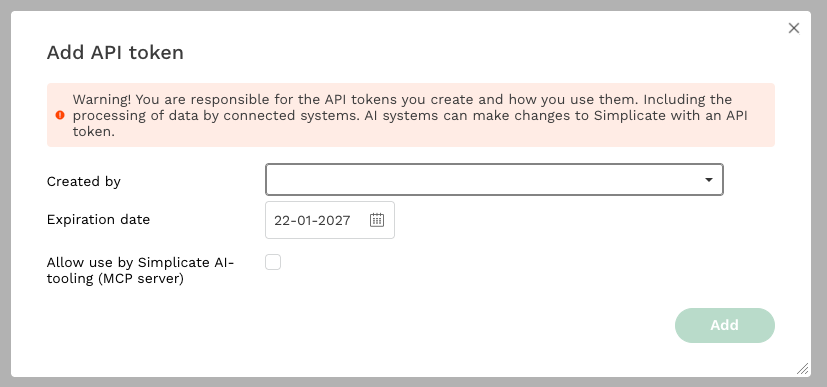
Handle API keys carefully. Keys enable modifications to your environment.
2. Determine your endpoint
The MCP API is available at:
https://<your-simplicate-domain>.mcp.simplicate.app/mcp
Replace <your-simplicate-domain> with your Simplicate environment domain.
3. Authentication
The token consists of an API-key and API-secret. Combine them with a : to get your authentication token: {API-key}:{API-secret}. For example: 1234567890:0987654321.
Use this token as a Bearer token in the Authorization header.
Client configuration
See specific documentation per client on how to add a remote MCP with authorization header
- Claude code: https://code.claude.com/docs/en/mcp#option-1-add-a-remote-http-server
- Codex: https://developers.openai.com/codex/mcp#streamable-http-servers
- Cursor: https://cursor.com/docs/mcp#using-mcpjson
Example mcp.json
{
  "mcpServers": {
    "simplicate": {
      "type": "http",
      "url": "https://<your-simplicate-domain>.mcp.simplicate.com/mcp",
      "headers": {
        "Authorization": "Bearer <your-api-key>:<your-api-secret>"
      }
    }
  }
}
Not all AI tools support this authentication method for MCP interaction.
Supported tools
When connected to the Simplicate MCP API you can view and use all available tools it provides. See MCP tools reference for al available tools.
Disclaimer
Simplicate cannot guarantee that AI-generated answers are always accurate. Responsibility covers only API quality and accompanying instructions.